
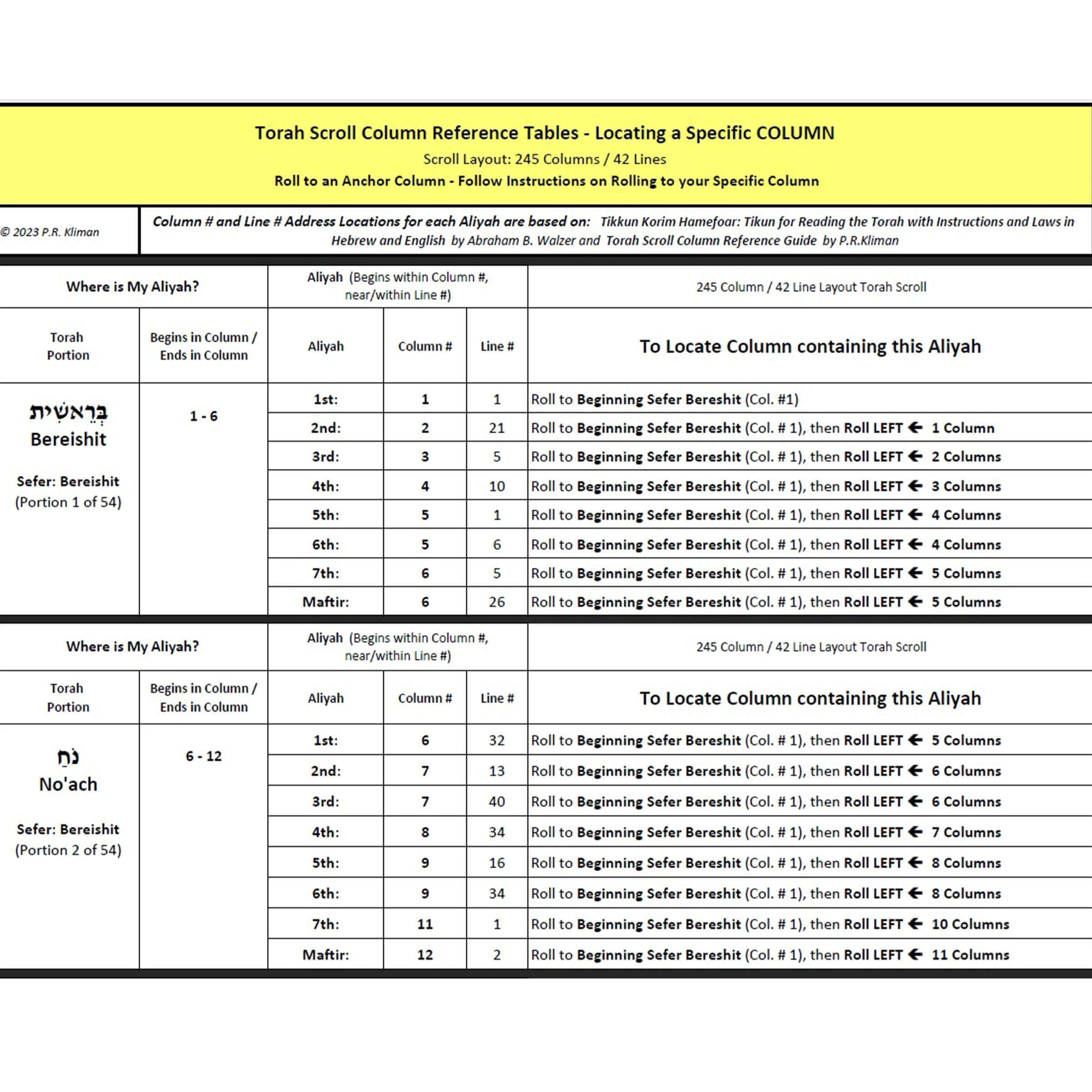
Locate Aliyah Within its Column – Reference Tables
- Version
- Download 33
- File Size 740.73 KB
- File Count 1
- Create Date March 19, 2025
- Last Updated April 8, 2025
Locate Aliyah Within its Column - Reference Tables
Finding your place in the Torah Scroll, or when practicing with a Tikkun Korim, is a two-step process:
- Locate the Column containing your Aliyah, then
- Locate the beginning text for your ALIYAH within that Column
These Reference Tables help you with the second step.
Scenario – Your reading is in Sefer Bereshit/Genesis, Parashat No’ach, Cohen Aliyah. Aliyah Address: Column # 6, Line # 32
You have Column # 6 in front of you. Using these Reference Tables, you notice that your Aliyah is preceded by an Open Space – so you look for an Open Space around Line # 32. When you find it, you look for the beginning text of the Aliyah. When there is a match, you can confirm you have found your Aliyah by matching the preceding words. You can now begin reading your Aliyah.